I had a sliding bookshelf class waiting to be used for the game so I will use that to create a puzzle level for the project however the class has some shortcomings that I have since learnt from and know how to deal with such as the collision box being the root component so if you want to change its location you have to move the entire blueprint
In the new system I have changed the heigharchy of the components so that the collision box is no longer the root component, this means that you can move the collision box instead of having to move everything around it
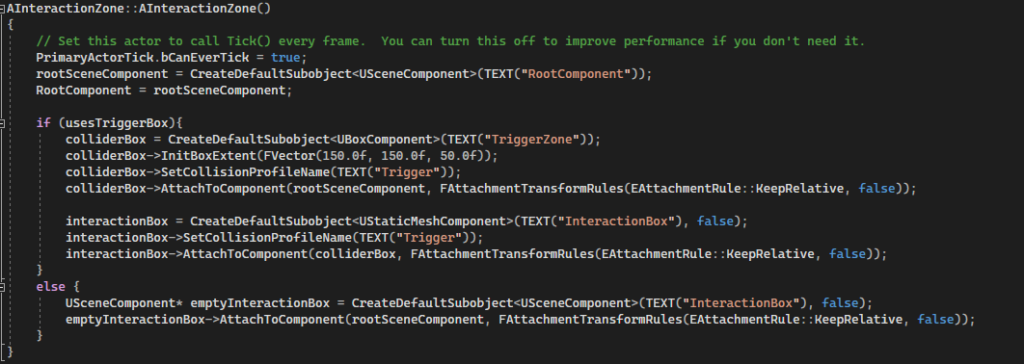
In the new version there is a seperate object that is made to be the root, along with that the 2 parts of the collision box, the visible and the functional, are now attached correctly so if you move the functional part the visible part moves with it
I have changed the way that the sliding block system checks which point (Start or End) its closest too, because it only checks once the movement is completed I only need to see if its closer to one than it is to the other, as well it seems my previous implementation was nonsensical as it runs an if statement with opposite checks to the ones needed to get to the if itself. Instead it will now run the if once the timer, that the object moves according to, ends
It now just changes the atStartPoint variable once the timer has run out as the object should always have made it to the other side by that point as the timer is used to calculate its position
I’m going to change the way that the sliding block handles interaction, currently it has a variable called object to move which is a single object however for the puzzle that I want to make I will change it so that it has an array of objects which will give me the ability to have each interaction zone affect as many sliding blocks as I want
This overhaul has caused a problem to arise involving my system to check if the object is at the start or end point, I should be able to exchange this previous system with just having the bool swap on timer end
Suddenly realised during this process that the way that I have gone about changing this will not work as it only supports one start and end point, I will need something external to handle all of the different start and end points, I will instead make something that will manage the sliding blocks (calling blocks from now on) and give the blocks a bool which dictates if it will be handled by something else (removing its collider) or not
It turnt out that I already had a really good system for handling this, This is a seperate class that has an array of sliding blocks that you can assign in the editor so you can choose how many different sliding blocks you want to be moved by one manager allowing many more options for layout
When it came to designing the room, I split it into two halves and for each door I’d give it a purpose before I placed it (first door is there to teach about buttons) top door is there to teach about single bookshelf buttons + hiding buttons, right door blocks a single and is a path to the final first half button (behind another shelf) etc, I do not believe there is a wasted door that the player will not have to think about
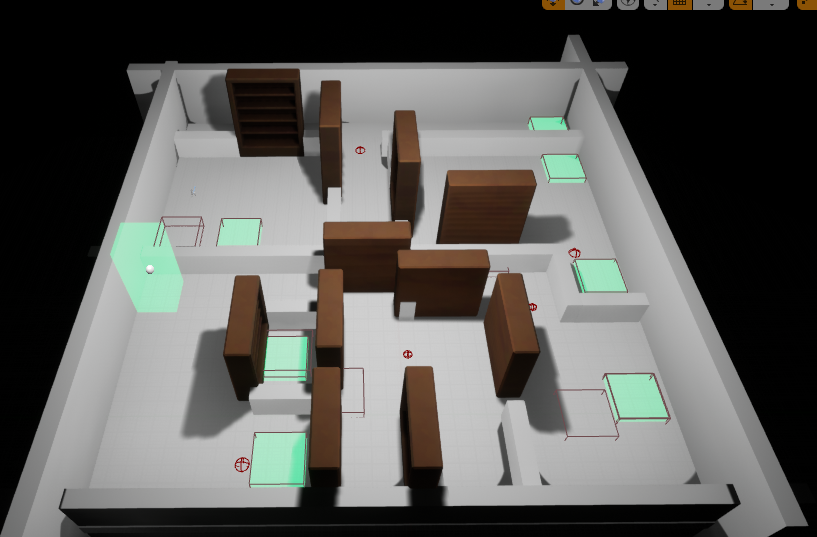
This is the overview of the map, it has lots of different buttons to press which are connected to different and sometimes multiple shelves
When I got to the second half of the room, to spice it up a little I added shelfs that would permenently move so that the player has to time their passes through
I have been tasked with completing the work that I had failed to finish during term 2. This includes;
The hypercasual game, the 3000 word essay, 4 of the CPP UE4 tasks, the personal planning folder,
a dev diary and the reflective learning summary, I also need to create a level for the collaborative
game made during the third term
I plan to create an endless runner with 3 lanes and obstacles that force the player to jump or crouch, in the style of Temple run 2 (reference) or Subway surfers (reference), The inputs will be sliding which I will handle by taking where they start the motion and then getting the direction to perform one of four actions moving left, moving right, jumping or crouching
17/07/22:
note version: UE4 default scene root causing issues in character blueprint, not being overriden by my own root component, fixed by remaking the player blueprint.
Installed Android studio and the UE4 Android SDK stuff to be able to test it on my phone.
UE4’s Android setup bat wasnt working due to an incorrect (presumably older) folder path, once fixed worked fine
Touch inputs set up, didnt define a function correctly leading to an error when constructing it, missed the “AMyClass::” before the function name
To create a sliding input system I will take the location that the player starts their touch and compare it to where they end their touch, using this to understand if they want to jump, duck or move left and right
PYTHAGORUS ADDING VECTOR A’s sq(X^2 + Y^2) THEN COMPARING TO VECTOR B’s sq(X^2 + Y^2)
New plan: minus vector A and B X’s and Y’s, use that to make new vector and see if the hypotenuse of that is helpful
UP EXAMPLE: (.5, .5) – (.6, .2) -> (-.1, .3)
Newer plan, subtracted the two vectors from each other and then do two seperate comparisons, one for positive increase (gets the bigger positive for downward or right swipes) and one for negative increases (for up or left swipes)
RIGHT EXAMPLE (.5, .5) – (.8, .4) -> (-.3, .1)
going to create four if statements one for each direction, it’ll check that the x / y is greater / less than a target number (0.1)
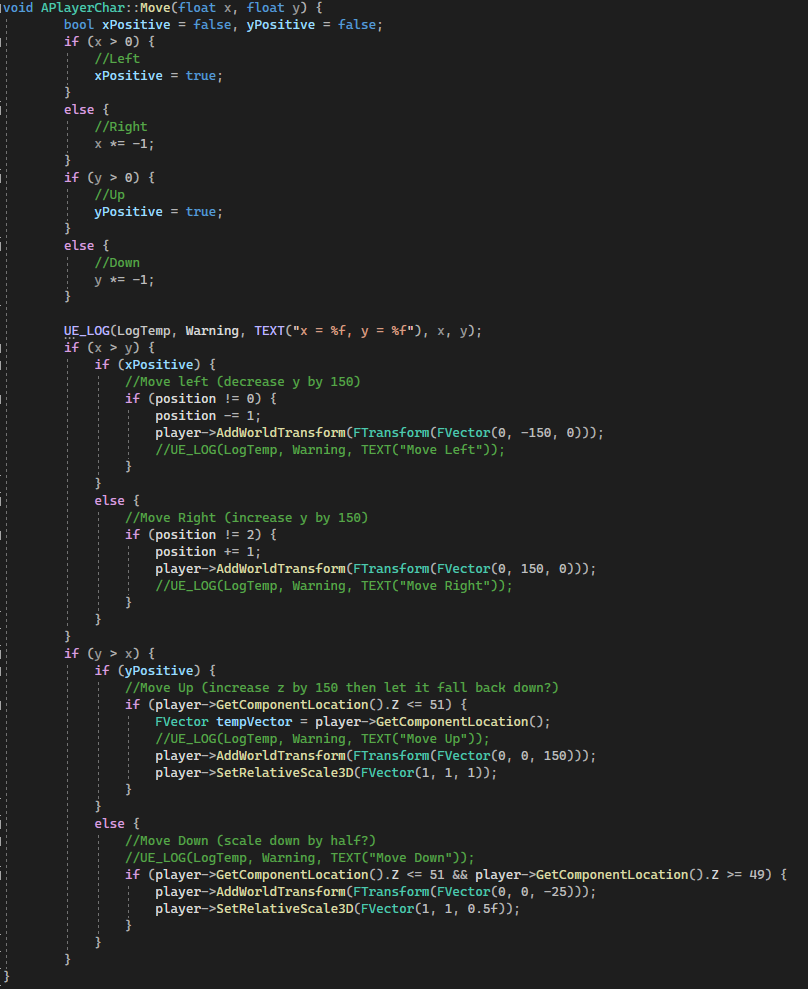
First we’ll check to see if X and or Y is positive so that we can do more accurate checks if (X > 0) //Positive (Left) keep track of with bool xPositive else //Negative (Right) if (Y > 0) //Positive (Up) else //Negative (Down)
Added a preliminary check to make sure that neither value is within the dead zone (if either x or y is less than 0.1 and greater than -0.1 then we can skip checking) otherwise we can just check if they’re negative and if they are times them by negative 1 to make them positive and then compare that, add something that keeps track of if it was originally negative so we know direction and it should work
Moving down needs to both scale and move the player, an if statement handles slowly moving the player up the 25 units we move it down by so i should be able to use how much its moving / how much it needs to move in order to know what scale it needs to be at from 0.5 to 1 so thats a ratio between 0.5 and 25 (0.02 in scale for each unit) so we’ll get the position per tick (the position will only be between 25 and 50 unless they move up which I’ll have a reset for) and times it by 0.02 to get what scale we should be at
This handles the touch input and saves where the player started touching and stopped touching for use later, it then shrinks the touch inputs to the actual viewport / screen size before getting the final float values which are the starting and end points subtractedThis first checks to see if either x or y from the previous step are negative and if they are they’re made positive but it is saved that they started out negative, the x and y is compared to see which is longer (and therefore the intended direction) before a last check to see if the longer value was originally negative. The outcome of this gives us one of four directions, Up Down Left or Right. The next section handles whichever one it was, if left or right then it checks that the player isnt too far left or right and then moves them by a set amount and increases the value that keeps track of them (its a 0 – 2 int which represents the 3 possible locations). For the up the cube is raised into the air and then an if statement brings it down at a fixed speed. For the down the cubes scale is reduced to half and the position is lowered, the scale is then risen proportionally with the position
28/07/22
Creating an object spawner: trying to have an array of objects which will be randomly chosen from when an obstacle needs to be spawned, however the spawnactor function requires a class as the input and I do not know the class, I have a few options on how to deal with this, I can either create many different spawnactor calls behind a switch statement and check which is wanted or I can try to figure out how to use the array with the spawnactor call so that I only need one. I went for the latter as I want this to be scale-able even for a short project as I do not know how many obstacles I will make
After being unsuccessful in my attempts to spawn objects using the SpawnActor function I will instead create a blueprint of my C++ class and use the function in that as I have seen examples where this had worked
I moved most of my code over to blueprint but I kept a function to choose a spawn point for the obstacle at random as I do not know how to do this in Blueprint
I have added a second random range function to the timer as I want the obstacle spawning to feel random so the time needed can be half or double of the normal spawn timer
I’m going to use the gamemodebase c++ class in order to make a score counter that’ll increase with time, I hope to also use this score counter to either decrease the time between obstacle spawns or increase the speed of the obstacles, or both.
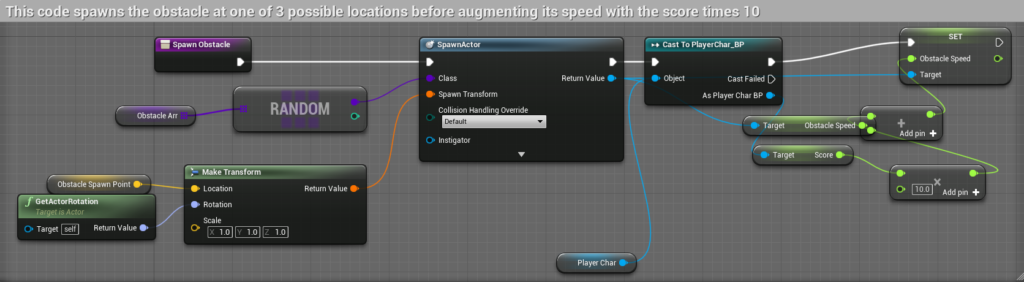
I have instead used the player class and kept the score in there as it doesnt change anything keeping it outside of the player class along with using the score to decrease the time before spawns and increase the speed of the obstacles